
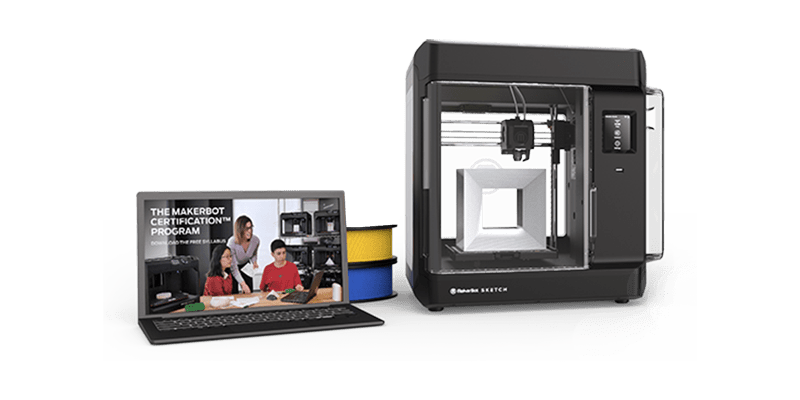
Makerbot Sketch Classroom 3d printer
Original price was: $4,078.98.$3,874.98Current price is: $3,874.98.-5% OFF
MAKERBOT 3D CLASSROOM BUNDLE (2x PRINTERS, 4x PLA, 4xBUILDPLATES, 2x ACTIVATION CARDS)
Rent, Lease, Buy
P: Call Now E: Request Quotation
In stock
Description

- – The access you need to print your students’ projects and keep innovation going strong
- – Combine Hybrid Classroom Teaching with Hands on Learning
- – Unlock students’ creative potential with accessible 3D printing merged with project-based learning
Develop Professionally, Gain Confidence
- – Over 15 hours of student curriculum with Design Thinking and 3D Printing
- – ISTE-certified 3D printer training for both teachers and students
- – 3D Printing-Integrated Curriculum training for teachers with applicable PD credit
3D Printing Collaboration from Anywhere
- – Free cloud-based software with MakerBot CloudPrint integrated with Google Classroom
- – Design-to-Print integrations across familiar softwares like TinkerCad, Fusion 360 and Onshape
Lower the Curriculum-Planning Barrier
- – Access 600+ lesson plans across various grade levels & subjects
- – Join the largest 3D printing community of educators
- – Curated lesson plans created by MakerBot Certified Educators
MAXIMIZE STUDENT ACCESS AND EDUCATOR SUCCESS
Flexible Printer Setup
The SKETCH platform supplies you with what you need to integrate 3D printing into the new school year successfully — whether that’s back in the classroom or teaching from home.
ISTE-CERTIFIED 3D PRINTER TRAINING FOR BOTH TEACHERS AND STUDENTS
MakerBot Certification™
With over 15 hours of student curriculum accessible online, our Certification program gives your students the tools to build and strengthen their design thinking skills with 3D printing. Get access to a full set of interactive content, projects, quizzes and exams developed by MakerBot Certified Educators.
MANAGE YOUR CLASSROOM’S PRINTING LIKE A BOSS
MakerBot CloudPrint™
Bringing you MakerBot CloudPrint – an entirely new way for teachers and students to collaborate and share access to MakerBot 3D printers – even when learning remotely. All of the benefits of our easy to use MakerBot Print software made available online.
ACCESS HUNDREDS OF LESSON PLANS FROM EDUCATORS ALL ACROSS THE COUNTRY
600+ Certified Lesson Plans
Get access to community-driven lesson plans reviewed & approved by MakerBot Education. Find lesson plans designed for grade levels and subjects applicable to your classroom and curriculum.
RELIABLE PRINTS EVERYTIME
Heated and Flexible Buildplate
Heated build plate for secure, successful printing and a flexible surface to make removing finished prints a breeze.
INTUITIVE INTERFACE
Touch Screen Controls
Start, monitor and pause your students’ prints with an intuitive interface, designed for easy 3D printing navigation.
CLASSROOM FRIENDLY
Enclosed Chamber and Particulate Filter
Place your printer anywhere in the classroom without worrying about curious hands and print with peace of mind with a particulate filter installed in each printer.
WHAT’S INCLUDED WITH THE SKETCH CLASSROOM
ONE MAKERBOT SKETCH™ DESKTOP 3D PRINTER
- Ⓐ 1 MakerBot SKETCH™ 3D Printer
Ⓑ MakerBot Cloud™ - Ⓓ 2 MakerBot PLA Spools
- Ⓔ 2 Build Plates
- Ⓕ 1 Spatula
- Ⓖ 1 Snip
THE MAKERBOT CERTIFICATION™ PROGRAM FOR STUDENTS AND TEACHERS
- Ⓒ 1 Seat in MakerBot Certification™ for Educators
- Ⓒ 5 Seats in MakerBot Certification™ for Students
TWO MAKERBOT SKETCH™ DESKTOP 3D PRINTERS
- Ⓐ 2 MakerBot SKETCH™ 3D Printers
Ⓑ MakerBot Cloud™ - Ⓓ 4 MakerBot PLA Spools
- Ⓔ 4 Build Plates
- Ⓕ 2 Spatulas
- Ⓖ 2 Snips
THE MAKERBOT CERTIFICATION™ PROGRAM FOR STUDENTS AND TEACHERS
- Ⓒ 2 Seats in MakerBot Certification™ for Educators
- Ⓒ 10 Seats in MakerBot Certification™ for Students
Technical Specs
PRINTING
Print Technology
Fused Deposition Modeling
Build Volume
150mm x 150mm x 150mm
[5.9in x 5.9in x 5.9in]
Layer Resolution
100-400 microns [0.0039 IN-0.0157 IN]
Print mode tuned for 200 microns
Material Diameter
1.75 mm [0.069 in]
Material Compatibility
MakerBot Sketch PLA Material
MakerBot Sketch Tough Material
Extruder Compatibility
MakerBot Sketch Extruder
Nozzle Diameter
0.4 MM [0.015 IN]
Print File Type
.MAKERBOT
TEMPERATURE
Ambient Operating Temperature
15-30°C [59-86°F]
Storage Temperature
0-55°C [32-131°F]
SIZE & WEIGHT
Product Dimensions
433.4mm (H) x 423.1mm (W) x 365.0mm (D)
[17in (H) x 16.6in (W) x 14.4in (D)]
Shipping Box
549mm (H) x 517mm (W) x 46mm (D)
[21.625in (H) x 20.375in (W) X 18.25in (D)]
Product Weight
11.8 kg [26 lb]
Shipping Weight
17kg [37.5 lb]
MECHANICAL
Build Surface
Grip Surface
Build Plate Leveling
Heated with removable flexible build surface
SAFETY & COMPLIANCE
Safety
Fully enclosed
Particulate Filter
UL, CE, FCC
IEC/ EN/ UL60950-1, IEC/ EN/UL 62368-1
SOFTWARE
Software Bundle
MakerBot Print Software
Supported File Types
MakerBot (.makerbot)
STL (.stl)
SolidWorks (.sldprt, .sldasm)
InventorOBJ (.ipt, .iam)
IGES (.iges, .igs)
STEP AP203/214 (.step, .stp)
CATIA (.CATPart, .CATProduct)
Wavefront Object (.obj)
Unigraphics/NX (.prt)
Solid Edge (.par, .asm)
ProE/Creo (.prt, .prt., .asm, .asm.)
VRML (.wrl)
Operating Systems
Windows (7, 10)
Mac OS X (10.12+)
NOTE: Does not support Mac Catalina
CAD Plugins
SolidWorks, Autodesk Fusion 360, Onshape, Autodesk Inventor
ELECTRICAL
Power Requirements
100-240 V, 50-60 HZ
2.7-1.3A
Connectivity
USB, Ethernet, Wifi
CAMERA
Camera resolution
2 megapixels
SKETCH Classroom is built to be the complete 3D printing classroom setup with an ideal student-to-printer ratio that maximizes students’ access and teachers’ success in the
The SKETCH Classroom addresses the challenges of 3D printing in the classroom with a solution that includes interactive certification courses for both teachers and students that trains them on how to use the MakerBot SKETCH 3D printer, create and implement engaging curriculum, and teach design thinking and problem-solving with 3D printing.
The SKETCH Classroom offers a unique workflow solution that addresses the printer-to-student ratio challenge and provides the best setup for effective deployment. The SKETCH firmware and print management software are natively connected to MakerBot Cloud™ platform and incorporate a full suite of 3D printing applications. The SKETCH Classroom software suite provides print design, preparation, and management as a single solution out of the box. Students are able to submit their designs via MakerBot Cloud through their MakerBot account on my.makerbot.com, and teachers can seamlessly manage, queue up and monitor their students’ 3D printing projects. This is designed to be the best 3D printing setup for the classroom, making 3D printing more accessible to students, and setting educators up for 3D printing success.
The SKETCH Classroom includes:
-A set of two (2) MakerBot SKETCH 3D printers, with each featuring a fully-enclosed printing chamber, a heated and flexible build plate, a particulate filter, touchscreen capabilities, on-board camera, and Wi-Fi capabilities
-Two (2) teachers’ and ten (10) students’ licenses for the MakerBot Certification™ programs, which certify teachers in printer operations and curriculum creation and educates students in 3D printing, innovative design thinking, problem-solving, and critical thinking skills.
- -MakerBot Cloud, a fully-connected platform that provides teachers with seamless 3D printing file management, allowing them to manage, monitor, queue, and print students’ projects from any browser. MakerBot Cloud is integrated with leading CAD design software, including TinkerCad®, Autodesk® Fusion® 360, and Onshape®.
- -Thingiverse Education™, access to over 600+ 3D printing lesson plans created by educators and designed for all grade levels and subjects, and the largest active 3D printing educator community.
- -Industry-leading support from MakerBot’s support team comprised of 3D printing experts.
- -Compatibility with MakerBot PLA and Tough™ materials; available in a wide range of colors, including yellow, blue, red, white, and grey.
- -Includes: (2) Sketch Printers, (6) Spools of classroom-safe MakerBot PLA filament, (4) Build Plates, (2) Spatulas, (2) Snips, (2) Replacement Nozzles, (2) Seats in Teacher Certifications, (10) Seats in Student Certifications, MakerBot Cloud with Print Queuing and 1 year warranty
Rent, Lease, Buy
P: Call Now E: Request Quotation
Specifications
| Weight | 90 kg |
|---|

